

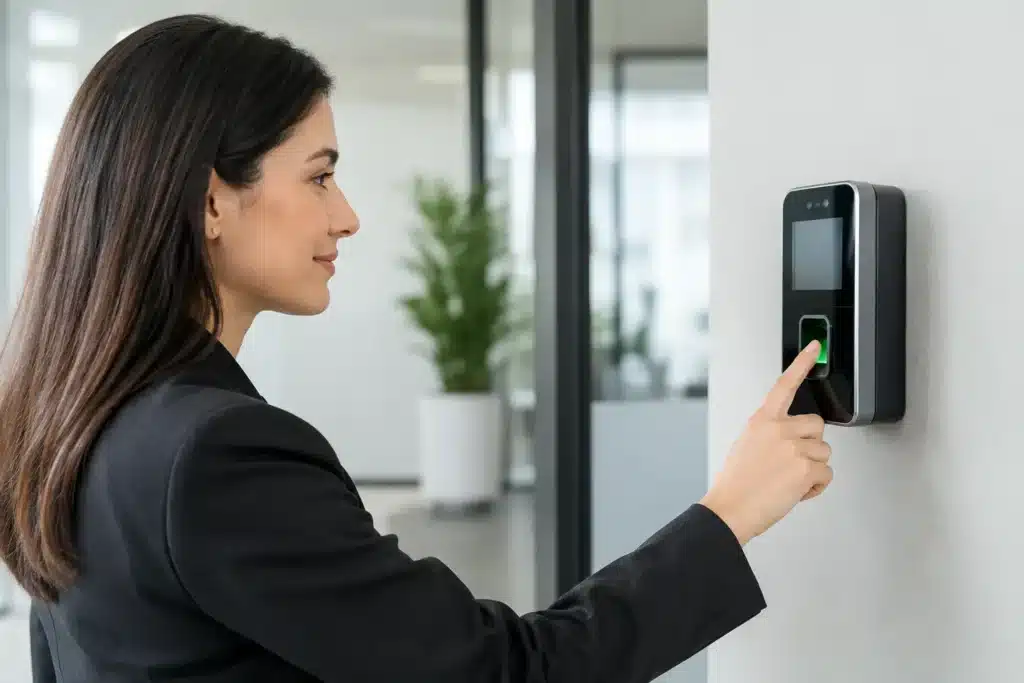
A biometric terminal mounted beside the door is not, by itself, an attendance system. If the device is placed in the wrong location, connected to an unstable network, or configured without clear attendance rules, it can create payroll disputes instead of accountability. Knowing how to install biometric attendance systems correctly means planning the full workflow: enrollment, verification, data transfer, reporting, privacy, and ongoing support.
For warehouses, offices, labor accommodation, retail sites, hotels, and industrial facilities, installation needs to reflect how people actually enter, exit, and work. The objective is simple: accurate attendance records, dependable reporting, and minimal disruption to operations.
Start With a Site Survey and Attendance Policy
The first decision is not which terminal to buy. It is where attendance should be recorded and what the records must prove. Walk the site during normal shift changes. Observe entry points, visitor traffic, peak arrival times, lighting conditions, and whether employees wear gloves, masks, helmets, or other protective equipment.
A single terminal may suit a small office with one controlled entrance. A warehouse with separate staff gates, loading bays, and day and night shifts may need multiple terminals. Employees should not have to walk across a large facility simply to clock in, but terminals also should not be placed where unauthorized people can use them on another employee’s behalf.
Before installation, document the attendance policy. Define shift start and end times, grace periods, break rules, overtime approvals, missed-punch procedures, and who can correct a record. A biometric system provides data. It cannot resolve unclear company rules.
Choose the Right Biometric Method
Fingerprint, facial recognition, and palm recognition terminals each have practical advantages. Fingerprint devices are widely used and cost-effective, but performance can be affected by dirty, worn, wet, or gloved hands. Facial terminals are often better for high-throughput locations and touch-free use, although they need controlled lighting and a suitable mounting height. Palm recognition can be useful where hygiene and contactless verification are priorities.
The right choice depends on workforce conditions, not just device price. For example, a clean corporate office may operate well with either fingerprint or face recognition. A dusty construction or industrial environment may benefit from facial or palm verification, paired with a card or PIN fallback for exceptional cases.
Plan Power, Network, and Mounting Before Installation
Every terminal needs reliable power and a dependable route for attendance data. Decide whether each device will connect through Ethernet, Wi-Fi, or a supported mobile connection. Wired Ethernet is generally the preferred choice for fixed commercial installations because it is more stable and easier to manage across multiple terminals.
Confirm the cable route before drilling or mounting. Cabling should be protected in conduit or trunking where required, clearly labeled, and separated from electrical power lines where practical to reduce interference and simplify maintenance. If the terminal is installed at an external gate or semi-open area, use equipment and enclosures suitable for heat, dust, moisture, and direct sunlight.
Mount the unit at the manufacturer-recommended height. The exact height depends on the biometric technology and the expected user group, but facial terminals must capture faces comfortably without forcing employees to bend, stretch, or queue. Avoid mounting directly opposite bright windows, reflective glass, or strong backlighting. These conditions can reduce facial recognition accuracy.
Provide backup power where attendance continuity matters. Connecting the system to a UPS can prevent lost records and shutdowns during short power interruptions. For larger sites, the installer should also identify how the attendance platform will recover after a network outage. Many professional terminals can store transactions locally and synchronize them once the connection returns, but this must be tested rather than assumed.
How to Install Biometric Attendance Systems Step by Step
Once the design is approved, installation should follow a controlled sequence. This reduces rework and keeps the physical installation aligned with the software configuration.
First, isolate the work area and install mounting brackets, backplates, cable containment, and any required weather protection. Pull and terminate power and data cables, then label both ends. Labels save time when a terminal requires service months later.
Next, secure the device, connect power and network cables, and confirm that it starts correctly. Assign a fixed IP address or a properly managed network reservation. A changing IP address can interrupt communication between the terminal and the attendance server. Set the correct date, time, time zone, and network time synchronization to prevent inaccurate clock-in records.
Then enroll an administrator account with restricted access. Default passwords should be changed immediately. Administrative rights should be limited to authorized HR, payroll, security, or facility personnel, depending on the organization’s internal controls.
After the terminal is online, add it to the attendance management software. Configure the site name, department structure, employee ID format, shifts, holidays, weekends, break schedules, and overtime rules. If the business uses payroll or HR software, confirm whether integration will occur through an approved connector, export file, API, or scheduled report. Integration should be scoped early, because employee IDs and pay codes must match across systems.
Finally, enroll a representative group of users before enrolling the entire workforce. Test employees from different departments and shift patterns. For fingerprint enrollment, capture enough samples according to device guidance. For facial recognition, ensure the user stands at a realistic distance and that the terminal recognizes the person under normal site lighting.
Test Real-World Scenarios, Not Just Device Power-On
A terminal that powers on and records one successful punch has not completed commissioning. The system should be tested against the conditions it will face every day.
Verify clock-in, clock-out, break, overtime, late arrival, early departure, and missed-punch workflows. Check that transactions appear in the software with the correct employee name, terminal location, and timestamp. Run an attendance report for a test shift and verify that the totals reflect the approved rules.
Test offline behavior by temporarily disconnecting the network, recording transactions, and restoring the connection. Confirm that records synchronize without duplication or loss. Where several devices are installed, ensure that an employee can use the authorized terminal at each assigned location and that the system does not create conflicting records.
It is also wise to test exception handling. What happens if a worker’s fingerprint cannot be read? Who approves a manual correction? How is a damaged device reported? Clear answers prevent supervisors from creating informal workarounds that weaken attendance control.
Protect Biometric Data and Staff Privacy
Biometric attendance data requires stricter handling than a conventional card number. The organization should collect only the data needed for attendance, restrict access, retain information for a defined period, and use the system only for the stated business purpose.
Employees should be informed about what data is collected, why it is used, who can access it, and how they can request corrections to attendance records. The precise legal obligations depend on the organization, jurisdiction, and workforce arrangements, so businesses should align their process with applicable UAE privacy requirements and internal legal guidance.
Technical controls matter as much as policy. Use strong administrator passwords, role-based permissions, secure network segmentation where appropriate, encrypted communication when supported, and regular backups of attendance records. Do not allow shared administrator accounts. An audit trail should show who changed schedules, edited records, or added employees.
Train Supervisors and Build a Support Routine
Most attendance problems after go-live are operational, not hardware failures. Supervisors need practical training on reviewing exceptions, approving corrections, exporting reports, and escalating faults. Employees need a short explanation of where to clock in, how to enroll, and what to do if the device does not recognize them.
Set a maintenance routine from the beginning. Keep sensors and camera areas clean, check device health and synchronization status, review storage capacity, and test backups periodically. As staffing, shift patterns, or facility layouts change, update the system rather than relying on outdated rules.
For multi-site operations in Dubai, Abu Dhabi, Sharjah, or across the UAE, centralized reporting can give HR and management visibility across branches while allowing local supervisors to manage daily exceptions. The design must still account for each site’s network quality, workforce flow, and access requirements.
A professional installer should leave the site with documented device locations, IP details, user roles, test results, and handover records. ALNAJAH ALAWAL supports this end-to-end approach, from site survey and installation through testing, staff training, and maintenance support.
The best biometric attendance installation is the one employees can use quickly, managers can trust, and payroll can rely on without manual chasing. Plan for real conditions, test every exception, and keep the system maintained after the first successful clock-in.